
We strongly recommend that you create a separate API user for each merchant profile, so that each user has access to only one profile.
However, it is possible to create an API user with access to more than one profile. If your API user has access to more than one profile, you must include the profile_id as a query parameter with all API requests.
If your user has access to more than one profile and you do not send the profile_id, the API will respond with a 422 error and the message Bad Request.
{
  "error": "Bad Request"
}
The API will return the same response if the order id is not found.
New integrations and multi-profile users onlyThe profile_id parameter is not required for API users with access to one profile only.
Integrations created before multi-profile users were introduced in October 2024 are not affected. You do not need to update these existing integrations to add the
profile_idquery parameter.If you follow our recommendation and create users with access to one profile only, then you do not need to add the
profile_idquery parameter.
To check how many profiles your API user can access and to obtain the profile ID for each profile that your API user can access:
- Go to the user icon menu and select Users
- Next to your API user, click the eye display button beside the user. BillPro displays the User details.
- Under Merchants, the list displays the IDs and names of the profiles you can access.
The following screenshot displays a user that can access two merchant profiles with IDs of 5 and 1.
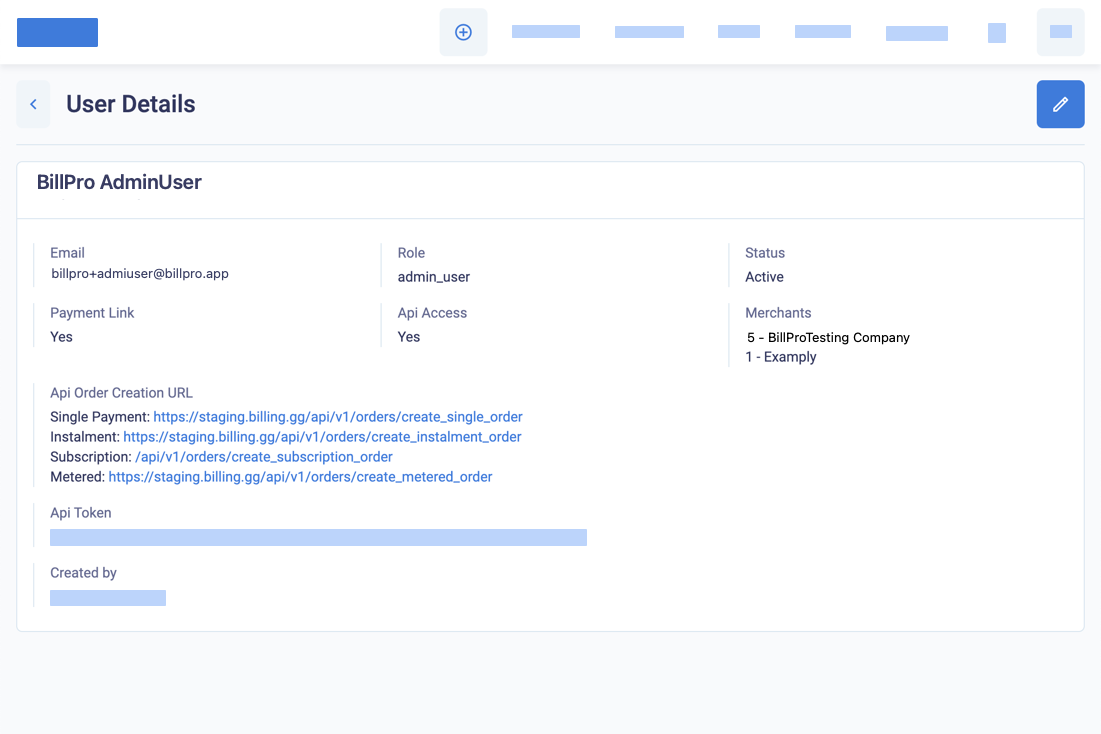
Display the user details, including the merchants list
Here is an example of the request to list the customers of the merchant with a profile ID of 1, which is the Examply merchant.
curl --request GET \
     --url 'https://staging.bill.pro/api/v1/customers?page=1&profile_id=1' \
     --header 'Authorization: Bearer YOURAPIKEY' \
     --header 'accept: application/json'
If your API user has access to more than merchant profile, you must send the profile_id parameter with all API requests.