

Declined transactions
Why was a transaction declined?
This page explains how to tell why a transaction was declined, and whether you can retry it.
The approval flow, Visa Category Codes and Merchant Advice Codes apply to all merchants. The gateway codes apply to CardCorp merchant accounts.
Transaction approval flow
A transaction goes through these steps in order:
- Gateway
- Acquirer
- Card issuer and card scheme
A declined transaction may stop before the last step. The codes in the response show how far it got.
flowchart LR
  BillPro -->|Request| Gateway
  Gateway -->|Approved| Acquirer
  Acquirer -->|Approved| Issuer["Card issuer
  and scheme"]
  Gateway -.->|"Declined: Result Code"| BillPro
  Acquirer -.->|"Declined: acquirer response"| Gateway
  Issuer -.->|"Approved or declined: Scheme Response Code,
  MAC or VCC for recurring payments"| Gateway
Declined transactions
In the live environment, an approved transaction has a gateway Result Code of 000.000.000. Any other value means it was declined, or that you're in a test environment. See the gateway result codes.
To see the codes for a transaction, open it from the Billing Events tab. See Transaction details.
CardCorp gateway
The gateway returns one or more codes that explain a decline.
- The gateway declines some transactions itself. For an expired card, the Result Code is
100.100.303. - If the acquirer or card issuer declines, the gateway returns a Result Code and Description. For example,
800.100.152means the issuer declined the card, with the descriptiontransaction declined by authorization system.
Acquirer and scheme responses
A non-zero Scheme Response Code and the Extended Description give more detail on why a transaction was declined.
For recurring payments, the card schemes also send a Visa Category Code or a Mastercard Merchant Advice Code. It tells you whether the decline is hard or soft:
- Hard decline: a permanent problem with the card. You can't retry it.
- Soft decline: a temporary problem. The card schemes let you retry up to 15 times within 30 days. BillPro can retry automatically, and you can retry manually.
If there is no code, the transaction may have been soft-declined, or it failed at the gateway.
Visa Category Codes (VCCs)
| Description | Visa Category Code | In BillPro |
|---|---|---|
| Approved | 0 | Approved |
| Issuer will never approve | 1 | Hard-declined |
| Issuer cannot approve at this time | 2 | Soft-declined |
| Data quality issues / revalidate data | 3 | Soft-declined |
| Generic response codes | 4 | Soft-declined |
Mastercard Merchant Advice Codes (MACs)
| MAC | Description | In BillPro |
|---|---|---|
| 00 | Approved | Approved |
| 01 | Updated/additional information needed | Soft-declined |
| 02 | Try again later | Soft-declined |
| 03 | Do not try again | Hard-declined |
| 04 | Token requirements are not fulfilled for this token type | Soft-declined |
| 21 | Payment cancellation | Hard-declined |
Examples
These examples show declined transactions on the CardCorp gateway. For each field, see Transaction details.
Expired card
The gateway declined this payment because the card expired. The Result Code is 100.100.303. You can't retry it: update the card instead. See Update cards.
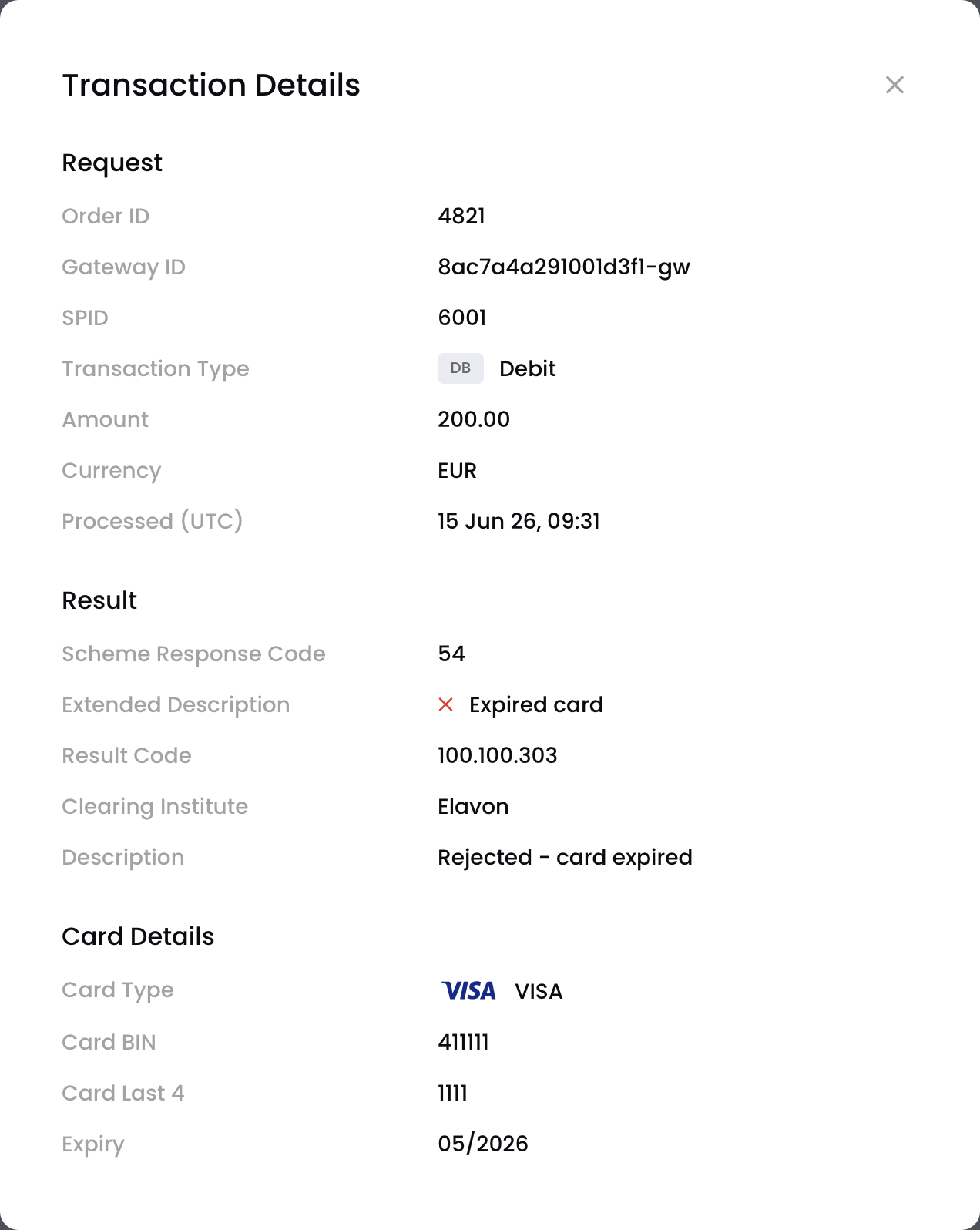
A hard decline for an expired card
Soft decline
This payment was soft-declined for insufficient funds. You can retry it, and BillPro can retry it automatically. See Auto-retry billing events.
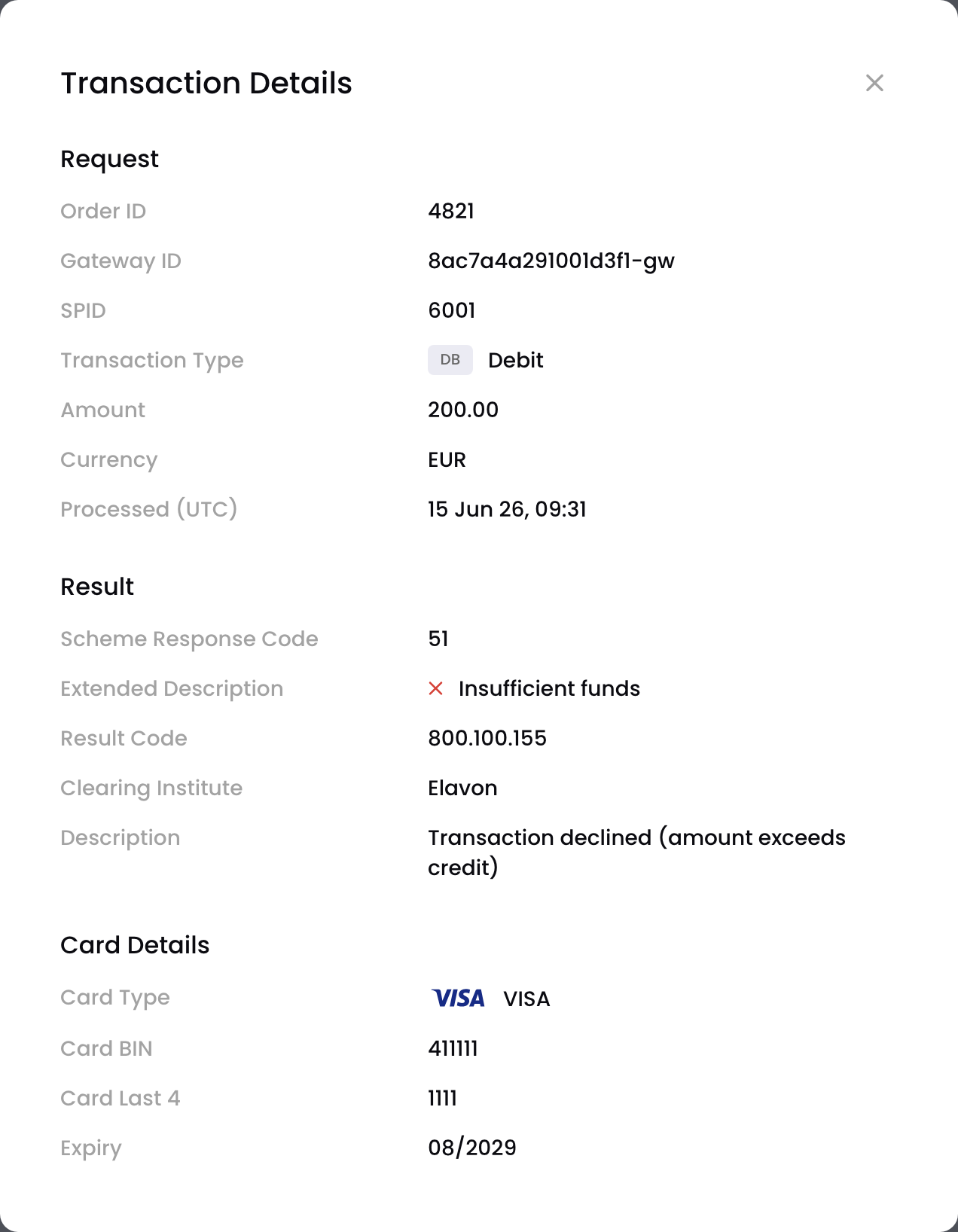
A soft decline for insufficient funds
Updated about 1 month ago